> For the complete documentation index, see [llms.txt](https://docs.messageflow.com/llms.txt). Markdown versions of documentation pages are available by appending `.md` to page URLs; this page is available as [Markdown](https://docs.messageflow.com/pl/e-mail/bezpieczenstwo-nadawcy/autoryzacja-nadawcow/autoryzowanie-domen-u-hostingodawcow/autoryzowanie-domeny-hostowanej-w-cyber_folks.md).

# Autoryzowanie domeny hostowanej w cyber\_Folks

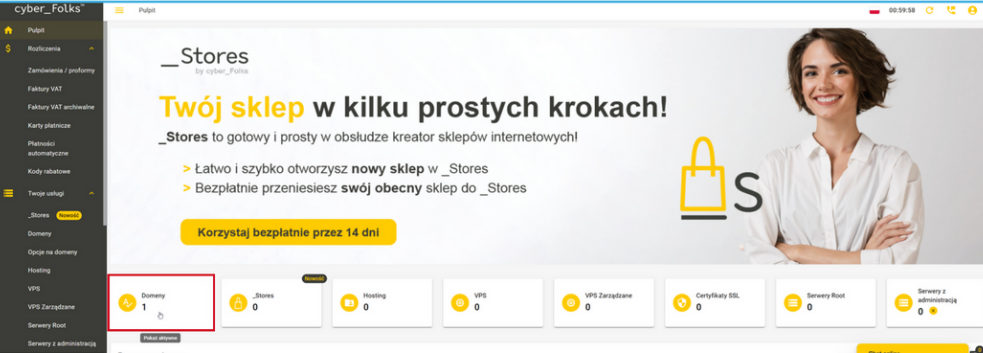
1. Zaloguj się do Panelu Klienta w usłudze cyber\_Folks. <br>

   <figure><img src="/files/SPGemE0OETvcTL55ZDSk" alt=""><figcaption></figcaption></figure>
2. Następnie kliknij w “Domeny”, aby zobaczyć aktywne domeny.&#x20;
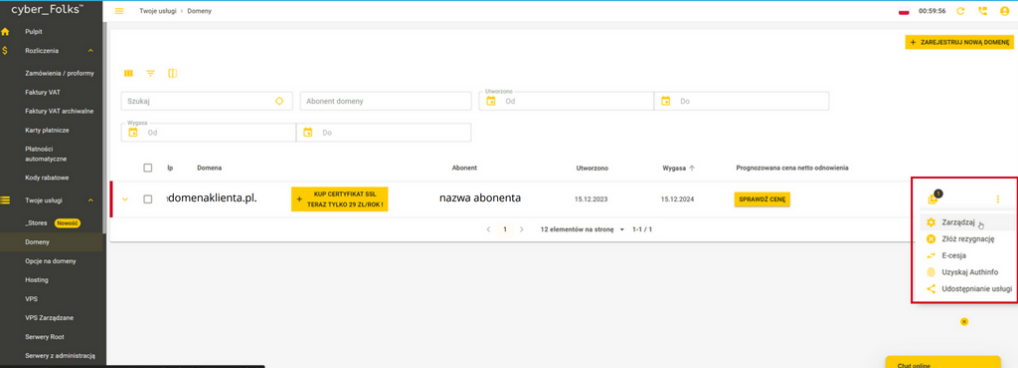
3. W następnej kolejności wybierz domenę, w której ma zostać skonfigurowana domena wysyłkowa.&#x20;
4. Z rozwijanego menu po prawej stronie wybierz opcję “Zarządzaj” <br>

   <figure><img src="/files/K73OuFT7VmwMXus47N7l" alt=""><figcaption></figcaption></figure>
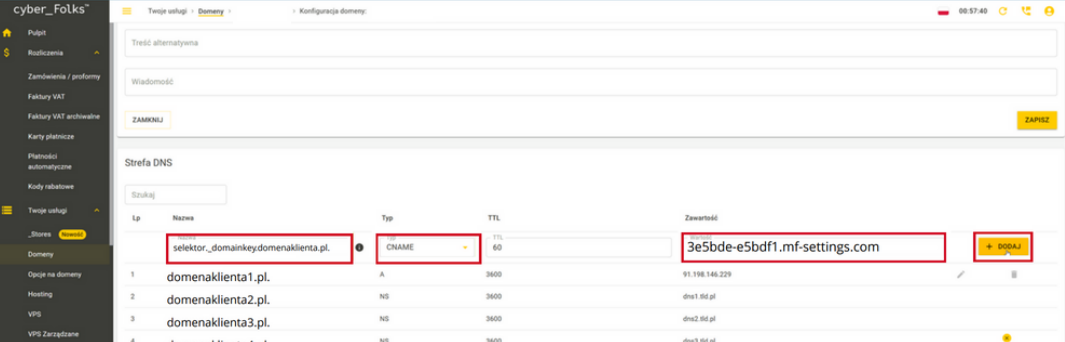
5. W polu “Nazwa” wprowadź domenę z ciągiem znaków: selektor.\_domainkey.twojadomena.pl. \[upewnij się, że wartość zakończona jest “.”].&#x20;
6. Wybierz typ rekordu “CNAME”.&#x20;
7. W polu “Zawartość” wprowadź wartość, która została wygenerowana w panelu MessageFlow.&#x20;
8. Następnie kliknij “Dodaj”. W razie pytań lub wątpliwości zalecamy bezpośredni kontakt z działem wsparcia technicznego dostawcy usług hostingowych, tak aby otrzymać precyzyjne i najbardziej aktualne instrukcje dotyczące Twojego konta. <br>

   <figure><img src="/files/fvyFg5QG6mwqjqhbwLQK" alt=""><figcaption></figcaption></figure>
9. Poczekaj na zatwierdzenie zmian przez system DNS. Może to potrwać od kilku minut do 24 godzin. Jest to zależne od propagacji rekordów DNS.

{% hint style="info" %}
W razie pytań lub wątpliwości zalecamy bezpośredni kontakt z działem wsparcia technicznego dostawcy usług hostingowych, tak aby otrzymać precyzyjne i najbardziej aktualne instrukcje dotyczące Twojego konta.
{% endhint %}
---

# Agent Instructions
This documentation is published with GitBook. GitBook is the documentation platform designed so that both humans and AI agents can read, navigate, and reason over technical content effectively. Learn more at gitbook.com.

## Querying This Documentation
If you need additional information that is not directly available in this page, you can query the documentation dynamically by asking a question.

Perform an HTTP GET request on the current page URL with the `ask` query parameter, and the optional `goal` query parameter:

```
GET https://docs.messageflow.com/pl/e-mail/bezpieczenstwo-nadawcy/autoryzacja-nadawcow/autoryzowanie-domen-u-hostingodawcow/autoryzowanie-domeny-hostowanej-w-cyber_folks.md?ask=<question>&goal=<endgoal>
```

`ask` is the immediate question: it should be specific, self-contained, and written in natural language.
`goal` is optional and describes the broader end goal you are ultimately trying to accomplish on behalf of the user. GitBook uses it to tailor the answer towards what is most useful for that goal.

The response will contain a direct answer to the question and relevant excerpts and sources from the documentation.

Use this mechanism when the answer is not explicitly present in the current page, you need clarification or additional context, or you want to retrieve related documentation sections.
