> For the complete documentation index, see [llms.txt](https://docs.messageflow.com/llms.txt). Markdown versions of documentation pages are available by appending `.md` to page URLs; this page is available as [Markdown](https://docs.messageflow.com/pl/e-mail/e-mail-api/analityka/raport-domen-odbiorcow.md).
# Raport Domen Odbiorców
Raport ten służy do szczegółowej analizy wyników dla konkretnych, ręcznie wybranych domen odbiorców. Wykorzystaj go, aby sprawdzić, jak Twoje wiadomości radzą sobie np. u kluczowego klienta lub partnera biznesowego (w odróżnieniu od "Raportu providerów poczty" który pokazuje automatyczne TOP 10).
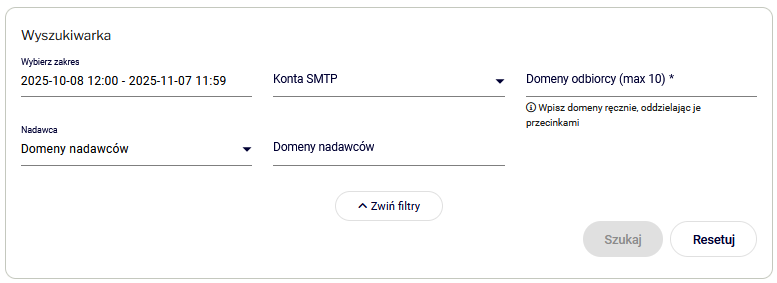
### Wyszukiwarka
Sekcja pozwala na filtrowanie danych według:
* **Zakres dat:** Umożliwia wybór okresu analizy.
* K**onta SMTP**
* **Domeny odbiorcy (Wymagane):** Możliwość ręcznego wprowadzenia do 10 domen.
* **Nadawca:** Filtrowanie po **Domenach nadawców** lub **Adresach nadawców**.
### Wyniki dla wybranych domen odbiorców
Dane prezentowane są w dwóch widokach:
#### Wykres (Analiza dostarczalności i interakcji)
Umożliwia śledzenie trendów dla wybranych domen w ujęciu godzinowym, dniowym lub miesięcznym. Pozwala na analizę wskaźników: Delivery Rate, Click Rate, Open Rate oraz Bounce rate.
#### Tabela (zestawienie szczegółowe)
Przedstawia surowe dane dla wybranych domen w kolumnach: Domena, Injected, Ok, Hardbounce, Softbounce, Dropped, Open, Track. Tabela posiada przełącznik pozwalający na wyświetlanie danych w ujęciu numerycznym lub procentowym.
{% hint style="info" %}
Pełne wyjaśnienie wszystkich statusów wiadomości (Injected, OK, Softbounce, Spambounce, Hardbounce, Dropped, Deferred, Open, Track, Feedback) znajdziesz w artykule [Statusy wiadomości](https://docs.messageflow.com/pl/e-mail/statusy-wiadomosci).
{% endhint %}